
Survival Guide
Galactic Civilizations Community
Be sure to visit http://www.galciv1.com for additional free downloads, enhancements, forums, guides, and more!
Creating your civilization
The very first thing you will do when you start a new game of GalCiv is to create the civilization that you will hopefully lead to galactic domination.
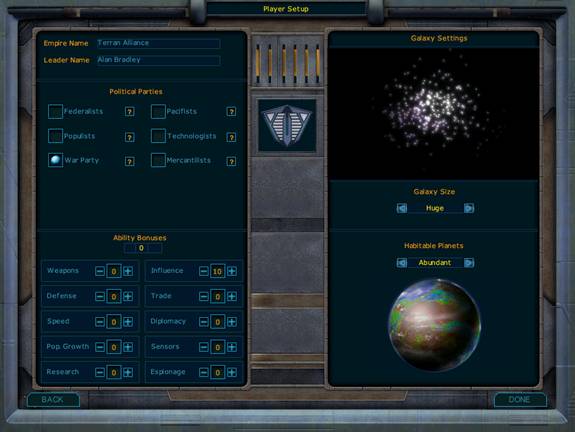
Figure 1 - Player Setup screen
This is the Player Setup screen. It is from here that you will tailor your civilization to your liking. You may also notice that you can configure the galaxy from this screen, but for now we are going to focus on customizing your civilization.
Figure 1: This is where you can name your civilization and your leader. You can name them whatever you want, simply click on the dialogue box and start typing.
Figure 2: This is where you select your political party. There are six political parties in GalCiv; each party supplies its own bonuses when they are in power. You will notice each party has a question mark beside their name, click it to receive information on each party. You will receive the bonuses that your party provides as long as it remains in power.
Figure 3: After choosing your political party, you can add up to 10 ability bonus points to key areas of your civilization.
Each point represents a 10% boost in a particular area. The categories for boosting are:
Speed
The number of moves your starships receive each turn. If a ship has 5 moves per turn, providing navigation 2 points will increase that number to 6.
Research
The amount of research each colony does per turn is increased by the percent you assign.
Espionage
The amount of espionage or destabilization that you assign is increased by the percent you assign here.
Sensors
The sensor range of your starships is increased by the number of units you assign here. A typical starship has a sensor range of around 3 light years (each move unit is 1 light year). A sector is roughly 12 light years across. Technically this only increases sensors by 1% as an ability but each 1% increases how many spaces out you can see..
Influence
The amount of influence your star systems provide is increased by the percentage you set here.
Trade
The revenue you receive from each trade route is increased by the percentage you set.
Pop. Growth
The rate in which your population increases is set by this.
Weapons
This ability can increase the strength of your ships weapons. For instance, if you have a battleship with an attack rating of 10 and your weapons ability is at 10%, your battleship’s attack rating would be increased to 11.
Defense
This ability is similar to weapons except it modifies the defense value for your ships.
Diplomacy
This effects how well you are able to get your way in negotiating with other civilizations. The better your diplomacy rating versus theirs, the harder the bargain you can drive. It also affects your foreign relations as you will tend to be able to avoid war easier (as well as come to peaceful terms) with a better Diplomacy ability.
Galaxy setting
Now it’s time to setup the galaxy in which the game will be played. You may select both the size of your galaxy and the number of habitable planets. Changing these settings can have a dramatic impact on the kind of game played. A tiny galaxy can be played in an hour or two; a gigantic Galaxy can take a great deal of time, possibly measured in months. It is recommended that for your first game you try playing in a small or medium galaxy in order to get accustomed to the game.
Configuring your opponents
Now that your galaxy has been created, it’s time to inject some life into it.
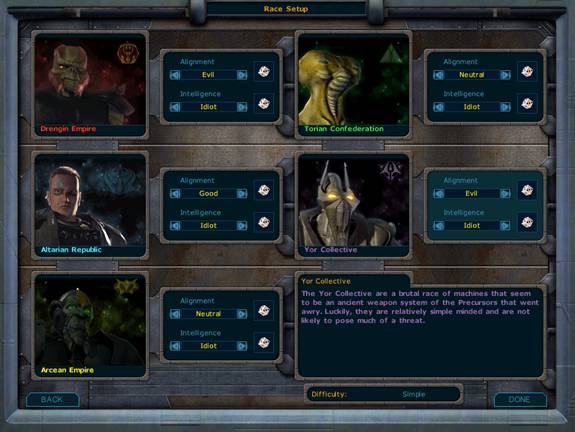
Figure 2 - Race Setup Screen
This is the Race Setup screen; from here you will choose the number of opponents, their intelligence, their moral alignment and even their names.
To remove a race from the game, simply click on their portrait to select them and then click again to remove them. You may add them to the game again by clicking on their empty portrait. If you wish to change the name of a race, simply click on the name field, erase the current name and type in a new one.
Each civilization can be given its own morality and intelligence level by clicking on the arrows beside their respective fields or by clicking on the dice icon, which will choose one randomly. Intelligence will determine how capable each race is, each level providing more and more of a challenge .It is suggested that you play your first game of Galactic civilizations with all enemies set to fool or normal. It is STRONGLY suggested not to play against a genius-level A.I. until you have some experience under your belt as a single genius A.I can dominate the entire game extremely quickly. Morality will affect a race’s foreign policy and what technologies are available to it.
Into the galaxy - Playing your first "GalCiv" game
Now that your empire, galaxy, and opponents have been customized to your liking, it’s time to actually get in and play. The very first screen you will encounter is the Research Screen
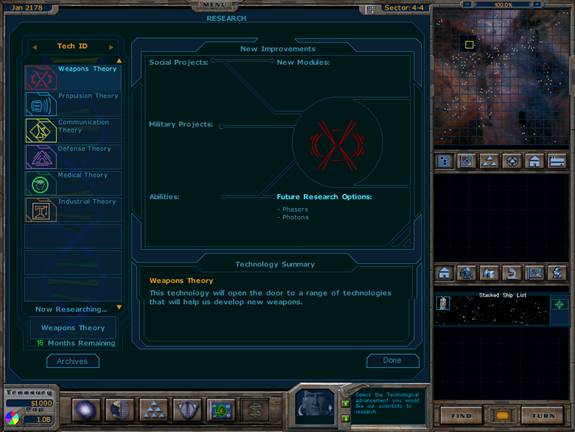
Figure 3 – Research Screen
It is from this screen that you will decide what technology your race will research. Different technologies have different research times and each will yield different results. When clicking on a technology you can see what future research options it will lead to, what social improvements it will provide, new vessels that will become available and any ability bonuses it will grant your empire. Now, choose the technology of your choice. Either Communication Theory or Propulsion Theory is suggested. Communications will lead to the Universal Translator, which will let you communicate with the aliens. Propulsion will lead to Impulse Drive, which will let you colonize faster.
After you have chosen a technology to research you will be brought to the Planet screen of Earth, currently your only colony.
The Planet screen displays key information on your planet.
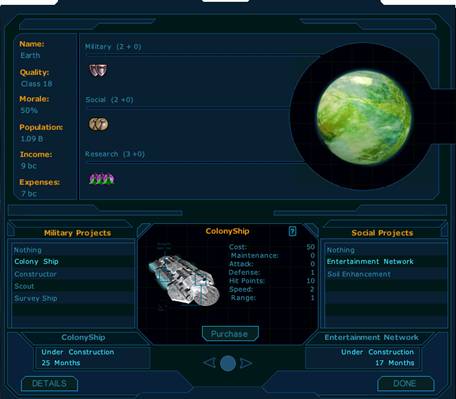
Figure 4 – Planet screen
A planet can construct both a military project and a social project at the same time. The speed in which these get constructed depends on your overall spending level as well as what ratio you are spending on, military vs. social vs. research. How many industrial units are being spent per month is displayed in the form of shields, hammers, and beakers depending on which category they are going into.
In the display, industrial units are displayed in the form of (X + Y). For example, your military production might say Military (4 + 1) for a total of 5 industrial units being spent on military projects. However, your treasury is only deducted by 4. The +1 represents a bonus production. Improvements in efficiency, productivity, etc. can provide you with free industrial units.
The display also shows what planet class it is, the higher the class, the better the planet. Class 15 and higher are consider desirable, though at times you may wish to colonize lower-quality planets for strategic reasons.
Morale indicates what your approval rating on that planet is. Anything over 50% is considered good. Morale affects the productivity of your population to a slight extent. The happier your people, the harder they work. Morale can be improved through the building of entertainment-related social projects.
At the beginning, your choice of military and social projects are limited, more will become available as you begin to research additional technologies. You begin with only two social improvements and 4 vessels available, none of which are armed. Clicking on each project will reveal their stats, including their build time. Further information can be obtained by clicking on the question mark in the center window when a project is selected.
When you build a ship or a social project, the amount of time in months is displayed. However, you can instantly build something by contracting it out to one of the 4 major human sub-contractors. These sub-contractors will build it for X amount of credits up front plus Y per month for Z months. Depending on your current financial situation, different choices will be appropriate at different times. To access the lease screen, simply choose a project and click on the Purchase button below the project’s picture.
Now, choose either the colony or the scout ship as your military project. You already start with one colony ship, but you are going to want more colony ships, a lot more. You may even want to purchase one straight out from Mitrosoft, whose lower initial price will take less of a bite out of your starting cash pool .The first few turns are all about getting your first colonies established as fast as possible. There are a limited number of habitable planets available and they go fast. The more systems you colonize in the beginning, the fewer you will have to fight for later. If you build a colony ship right away you can colonize stars nearby quickly (as well as come back to those systems later to colonize other suitable planets after your initial expansion rush). If you build a scout ship you can use its superior speed and sensors to locate suitable colonies faster, the choice all depends on your starting position. As for your social project, this will depend on your starting situation (which is random). If your moral is low you might want to build the Entertainment Network to increase it. Otherwise, go for the Soil Enhancement to increase the quality of your planet. When you are done configuring your colony click on Done. You will now be brought to the main map
This is the screen you will see most often. It includes the main Galactic Map, the mini-map, the graphs screen, the control panel, the starship bridge panel and the InfoNet. If you are already familiar with the interface and wish to move on then click here.
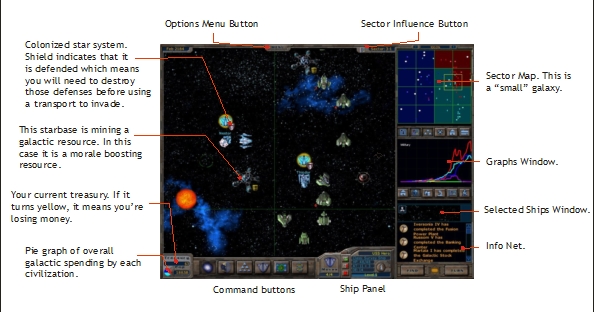
Figure 5 - The main game screen
Let’s discuss all of these:
The Galactic Map
The map will display the USS Discovery, the first colony ship created by the human civilization for colonizing another world. It will be parked just outside the Sol star system where Earth, Mars, Saturn, etc. are located.
A second ship, the USS Hero, is a survey ship that has been constructed at great cost to help explore the galaxy. Survey ships are a special class of ship, they contain equipment and special crews that allow them to seek out strange things and boldly go where no human has gone before. As you begin to explore the galaxy, it won’t take you long to find strange things worth investigating. Move your survey ship into an anomaly and you will discover what benefit, if any, it provides. Anomalies will continue to appear at various rates throughout the game. Many of them provide special, ship-specific bonuses. As time goes on, your civilization will research technology that will provide starships that are formidable military craft in their own right, while also allowing them to explore anomalies.
There are a number of keyboard commands that can streamline your game play.
|
Key |
Effect |
|
Cursor Keys |
Moves ships in specified direction. You may also use the numpad keys if Numlock is on. |
|
S |
Sentries a ship (ship will not be called on unless an alien ship comes within sensor range. |
|
G |
Guard mode (ship will not be called on unless an enemy alien ship comes within sensor range. |
|
TAB |
Finds the next available ship with moves remaining. |
|
SPACE |
Currently selected ship chooses to pass on its turn. |
|
F |
Turns multiple ships on the same tile into a fleet. |
|
U |
Un-Fleet. Breaks a selected fleet back into individual units. |
|
C |
Center on currently selected ship. |
|
B |
Build starbase (Constructor-class vessels only) |
|
A |
Auto-Survey (Survey-class vessels only) |
|
T |
Auto-Attack |
|
R |
Auto-Retreat |
|
W |
Sector Sweep |
|
D |
Decommission ship |
|
F1 |
Galactic Map Window |
|
F2 |
Planet List |
|
F3 |
Ship List |
|
F4 |
Domestic Policy |
|
F5 |
Foreign Policy |
|
F6 |
Technology Policy |
|
F7 |
Open Planet View for first planet in civilization |
|
F9 |
Tactical Map Window |
|
Ctrl-R |
Refresh your sensors across the galaxy. |
|
ENTER |
Go to next turn |
|
Esc |
Dismiss a dialog or bring up the Game options dialog |
The mouse also provides a large number of options as well.
Mouse Controls
Left clicking on a ship selects it. Right clicking on the map sends it on its destination. Clicking on space and holding down the left mouse button will “grip” space and allow you to adjust your view.
Holding down the Control key (Ctrl) while left clicking on multiple ships will allow you to select multiple ships. Holding down the Shift key while left click-dragging on the map will allow you to also do the same.
Double clicking on a ship, anomaly, resource or starbase will bring up additional information on that object. Double clicking on a star will bring up the planetary management screen for the first colonized planet you control.
Fog of War
There are two types of fog of war.
(1) The unexplored area of the map and
(2) The area that your sensors currently can’t detect.
Ships, Stars, Anomalies, Resources, and Starbases
On the main map there are 5 different types of objects that may exist there. Ships and stars are pretty straight forward. Anomalies are special objects that exist on the map that can only be explored by certain types of starships (ships with survey ability). Resources look similar to anomalies except that if you build a starbase on them that has mining abilities, you gain advantages from them. Starbases are built and upgraded with Constructor-class ships.
In all these cases you can find out more information on them by double clicking on the object.
The Mini-Map
The mini-map on the top right allows you to view the galaxy in different modes. At the top right of the mini-map are small + and – buttons that will zoom in and out of a particular sector. You can also use the mouse wheel to zoom in and out.

The bottom buttons provide the following displays:
Normal View: Shows explored sectors and star systems (undefended star systems appear darker).
Sector Owner: When a player achieves dominance in a sector (determined by population) that sector’s color changes to the player who controls it.
Ship View: Starships are displayed as small triangles. Privately controlled ships appear as a single dot on this screen.
Production View: This displays in circles of various sizes the production levels of different star systems.
Population View: This displays in circles of various sizes the population levels of different star systems.
The Graphs Window
Any race you have diplomatic relations with will appear here. You can track how well you are doing compared to your interstellar rivals and friends in terms of population, military might, economy, technology, and manufacturing.

The graphs are relative to one another.
The Control Panel
The panel at the bottom of the screen allows players to control what view the game is in. The main map is the default view.

The available views are:
Main Map View: This is the view we just discussed.
Planet List: Displays your list of planets
Ship List: Displays a list of your available ships
Domestic Policy: Set your civilization’s domestic policy
Foreign Policy: Set your civilization’s foreign policy
Research Policy: Set what technologies you want to research
The Bridge/Advisor Panel
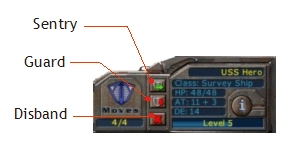
The currently selected ship will be displayed with its name, which you can change by clicking on the field, the class, the number of hit points it has, the Attack rating, the Defense rating and what level the ship is. As ships do battle, they gain experience which increases their level. The higher the level, the more bonuses in attack and defense they receive. If you are selecting a starship that carries colonists or troops, the number on board is displayed instead. Attack and defense levels can also be modified based on bonuses provided by starbase modules in the current sector.
If a ship isn’t selected, then an advisor will appear to offer advice to you on what you may want to do next.
The InfoNet
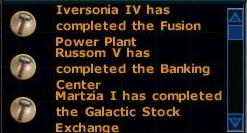
Events occurring in the galaxy that are of interest to you will appear on the InfoNet on the bottom right of the screen. Events can include ships being attacked, new projects completed, new starships built and more.
The Find Button

This is equivalent to the TAB key. It will find a ship in the galaxy that needs to be moved. If there are no ships that need to be moved, you will hear a little buzzing sound.
The Turn Button

Tells the game to cycle to the next move.
Exploring
Now it is time to explore your surroundings. For this you will use your survey vessel, and if you have one, a scout. The survey vessel is one of your most important vessels, as it is the only ship available to you at this time that can explore anomalies. Use your survey ship to look for more suitable systems to colonize, yellow stars being the most likely to hold suitable worlds. Make sure not to lose your first survey vessel, it being your oldest vessel, it will benefit from all ship bonuses that many of the anomalies will provide. Given time your survey vessel will be powerful enough to take on fleets of battleships single-handedly and will be the pride of your fleet for years to come. .While looking for new worlds, keep your eyes out for anomalies and galactic resources. Anomalies provide bonuses to your civilization in terms of permanent stat increases (extra attack/defense, bonus to soldiering, research etc.), free ships, decreasing time on your current research project and even wormholes that transport your ship to the distant reaches of the galaxy.
Galactic resources are colored geometric shapes on the star-map. Building starbases on these resources will provide a boost to your civilizations abilities; you can right click on a resource to see what kind of bonuses it provides. To build a starbase simply send a Constructor to a resource and answer Yes when the starbase build prompt appears. You can upgrade your mining operations (and other elements of your starbase) by sending more Constructors to add additional modules to the starbase.
Colonizing
After locating a suitable class-15 or above planet with your sensors, you'll want to establish your first colony. Move your initial colony ship to intersect the appropriate system. A dialog will appear giving you a chance to rename the system. Confirm your choice of name and then move the mouse cursor over the planet in the system you wish to colonize and click to select it.
The early phases of GalCiv favor an aggressive production schedule of colony ships to expand your empire. Since the other alien races have had thousands of years (in some cases) to explore the galaxy with remote probes, they already know where all the best planets are located and they will actively pursue them. In the initial years of the game, you may wish to adjust your allocation of resources to favor military projects and research (into Propulsion technologies) to ensure that the Terran Empire doesn't become a forgotten backwater in a corner of the galaxy.
Starbases
At a relatively low level of technology, you'll be able to build a new ship type called a "Constructor". A Constructor is just a special type of a ship that you fly to a particular part of space and then click on it to turn it into a starbase.
You can alternatively send it to an existing starbase to upgrade the starbase. To do this, you move the Constructor on top of a starbase and a dialog will pop up asking you if you want to upgrade the starbase. If you select "Yes" you are given a list of possible upgrades.
What upgrades you can provide will be based on the technologies you research. The only other limit is the amount of space these upgrades will take on your starbase (however, there will be technologies that lower the space due to miniaturization).
Starbases can perform a wide variety of actions. But because Constructors are VERY expensive to create, you'll have to make tough choices.
Starbases have these capabilities:
1) If you build a starbase on a resource, you can mine those resources for additional ability advantages. Controlling and exploiting galactic resources with starbases can make the difference between victory and defeat.
2) Support of starships in the sector they are in - i.e. give bonuses to the weapons, defense, speed, or hit points of friendly ships.
3) Trade bonuses - when a mini-freighter flies through a sector that has a starbase with trade upgrades, it can increase the amount of trade you receive from that trade route while the mini-freighter is in that sector. So a trade empire might create a whole line of trade starbases that follow its trade routes.
4) Influence bonuses. Starbases that improve your influence in a sector. Your overall influence determines the likelihood of a star system rebelling to join you without you having to conquer it. So put starbases with influence upgrades in sectors that you want to peacefully conquer.
5) You can also upgrade a Starbase into a Terror Star. After researching Terror Star technology, several new starbase modules become available. Once those modules have been added, the starbase becomes a weapon of mass destruction that can destroy entire star systems by imploding their stars!
Events and morality
During the course of the game various events will occur, usually asking you to make a moral choice. The choices you make you will affect the morality of your civilization. Example: Upon establishing a colony of Leta II you discover a race of strange wormlike creatures that feed off the nutrients in the planets soil. Do you:
A) Attempt to live in harmony with the creatures (-22% loss of planet quality)
B) Transport the creatures to a remote area where they won’t affect the colony
C) Exterminate them (+22% to planet quality)
Most evil decisions (like choice C) will provide you with a short term gain, however constant evil acts will change your races alignment to “evil” which means you will have a harder time diplomatically then races who are aligned with good. You may also decide to simply be neutral, thus avoiding the pitfalls of either side, but without any of the advantages either.
Trade
By researching "Communications Theory" and then "Universal Translator" and then "Diplomacy" you will then be able to research "Trade". After researching this technology your planets will be able to build freighters. Freighters have the unique ability to create trade routes between two worlds.
Creating a trade route is fairly straight forward at first glance: Send your freighter to a friendly alien star system (have it intersect that star system). Once this is done, a trade ship (a little mini ship) will begin traveling between the source and destination. As it travels the amount you receive from trade changes. The further along the route, the more the trade route brings in. For instance, a trade ship may only bring in 1 bc per turn when it first leaves. But on its way back, it may be bringing in 5 bc per turn.
This has an important implication: The longer the trade route, the more the trade route is worth. It also means you can create an effective economic blockade. In essence, you can cripple the economy of an enemy by keeping trade ships from being able to travel the whole route. If a particular civilization can’t keep their trade ships safe outside their immediate territory, then their economy will suffer.
The other factor in determining how much a trade route is worth is the combined wealth of source star system and destination star system. Generally speaking, it is best to have your freighters come from your best star system and go to the best star system in a particular player’s civilization.
Trade has a few side effects as well. First of all, both civilizations involved in the trade receive equal compensation from trade. So it’s probably best not to trade with civilizations you later expect to go to war with. Secondly, such trade influences diplomatic relations. Since war cuts off trade between the two warring factions, if your trade represents a sizeable percentage of their income, they are a lot less likely to want to go to war.
You may only engage in trade if you are a member of the United Planets.
United Planets
The United Planets passes laws that govern everyone that is part of it. You do not have to be part of the United Planets. But without membership, you cannot trade with other civilizations. The United Planets convenes to vote on galactic law. These laws can fundamentally change the way the game is played. Topics range from the base number of trade routes permitted to the creation of a temporary galactic ceasefire. Each race that is a member of the United Planets may vote. The more influence a race has, the more its vote is worth.
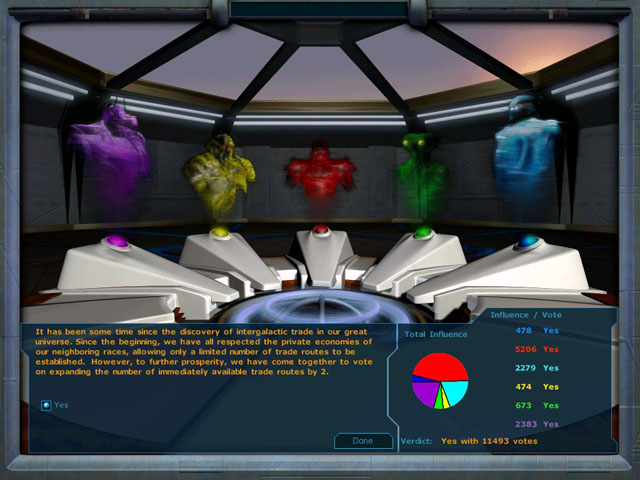
Figure 6 – United Planets screen
Minor Races
At some point in your galactic expansion, you will most likely encounter at least one minor race. Minor races behave exactly like major races with the exception that they do not count towards game winning conditions. They are also less likely to colonize systems outside their sector. Minor races usually inhabit above average planets and usually have a fair amount of wealth. Their wealth combined with their generally passive nature make them excellent trading partners who are also willing to pay high prices for some of your advanced technology, without much chance of them using it against you. Of course their homeworlds, being so hospitable, also make them very tempting military targets…
While there are always minor races at the beginning, it is possible for more minor races to be “created” throughout the course of the game. These races usually form when there is a split in an empire. For example, should enough of your worlds become dissatisfied with your rule they may break off to form the “Terran Peace Federation” who oppose your evil, war-making ways. These worlds will break away from your control and form their own empire, with their own budget, ships and technology. There are numerous other ways for minor races to form, most of them being linked to events.
Conflict
At some point in the game you and your rivals will have colonized all appropriate worlds (at least within a reasonable range). This is where the conflict will arise. All empires are constantly trying to expand, but without more available systems, the only way to gain more is through military force, diplomacy or cultural assimilation.
Should you decide to use military force your research resources will most likely concentrate on the weapons, defense and some of the industrial branches of the research tree. Weapons and Defense will provide new and more powerful ship classes while also providing improvements to your fleet in general. Research in the industry branch will eventually yield the repair technologies that allow your ships to regenerate some of their hp each turn.
To attack enemy ships simply place a move order on the enemy, a battle will follow. Battles work as follows.
Attacking ship rolls a number between 0 and its maximum attack and the defending ship rolls a defense value between 0 and its maximum defense value. The difference between the two is then subtracted from the number of hit points. If the defending ship survives they then reverse positions and the defending ship rolls it attack value and the attacking ship rolls its defensive value. This is repeated until one of the two ships has 0 hit points and that ship is destroyed.
Ships with a defense value that is greater than their attack value get a special bonus – when attacked, half their defense counts as an attack. A Battle Axe with 3 attack and 6 defense actually gets to roll up to a 6 for its attack roll when it is attacked.
It should be noted, that ships can only attack other ships and may not bombard planets. In order to actually conquer a planet, ground forces from a Transport-class vessel are required.
Invading Star Systems
A defended star system has a small shield attached to it. These star systems cannot be invaded. Starships must first take out those defenses. Those defenses come in the form of starships orbiting the star system that have a defense value. Attacking those starships is like attacking any other ship, move your starship to intersect the star system and it will automatically attack the first starship in orbit.
When a star system is defenseless, the shield is gone and is ready to be invaded. To do that, you must construct a Transport and load troops onto it.
Invading a star system shouldn’t be taken lightly. They can contain many billions of people and invading them can take billons of troops. Transports have little defense so those billions of lives should probably be escorted by starships who can defend them.
When a transport intersects a defenseless star system, the Invasion screen will be displayed.
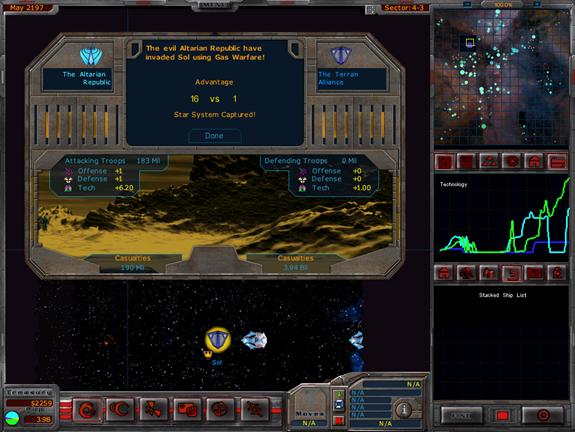
Figure 7 – Invading an Altarian system
This screen displays the advantages of both sides. The attacker automatically gets a significant advantage since transports don’t just come with ground troops but an entire air armada and thousands of ground support craft. But other factors do come into play such as the technology difference between the civilizations, general soldier abilities on both sides and what planetary defenses have been constructed. There is also a luck factor.
The attacker now has a choice in exactly how they plan to invade. The number of options available to you is dependant on your technology. Each option has its own advantages and disadvantages, as well as a cost associated with it. For example, you may choose to use Mass Drivers which will increase your advantage by 100-200%, however it will reduce the planet quality by 10-50% and destroys 50-100% of all planetary improvements while costing 1000 bc to launch the attack. The attack is highly effective, but it will also devastate the planet. You may instead decide to go with a Traditional invasion, which gives no boost to your attack advantage, but will not harm the planet or its social improvements.
Diplomacy
There are other ways to conquer the galaxy than through weapons. Your cultural influence reflect how much the way you live, the philosophies you espouse, the clothes you wear, the food you eat, and the movies you watch affect alien cultures.
Different star systems have different base levels of influence that are generally based on the quality and position of the star system in the galaxy. This is then enhanced by the population of the planet along with what social projects you build. You can intentionally try to increase your cultural influence by building social projects such Cultural Exchange Centers where alien travelers are more effectively exposed to your way of life.
Whichever civilization has the highest level of influence in a given sector (above a certain threshold) gets that sector color-coded to their civilization. If the level of influence exceeds all others by a certain amount, then a given star system has a chance of defecting to a different civilization.
You can magnify your influence in a given sector by building starbases and upgrading them with Constructors to have cultural influence modules (more on modules in the Starbase section).
Being on the receiving end isn’t a lot of fun though. We can speak from experience when we say that there’s nothing worse than seeing teenagers running around in native Drengin clothing. Particularly since their clothing requires the importation of the Kandarian Silk Lice which we won’t get into here. Suffice to say that this is not a desirable outcome.
So how do you prevent this? Factors that come into play include looking at how much military might is in orbit of that star system. The locals on Deneb IV may think that Arcean music is great (and let’s face it, there is some debate on whether we can even hear all of the chords on a typical Arcean harp). But the locals aren’t going to realistically be able to defect if you have enough battleships parked in orbit. Another factor is the morale of your planets. Torian blood larva may be taste great, but if the people are happy they’re not going to be nearly as interested in joining up with the Torians.
The most effective way to combat alien cultural influences is by building social projects that combat it. Anything that increases your cultural influence will certainly help. But you can also build things that have a propaganda value. i.e. you can build news networks and propaganda centers that will help keep alien culture just that – alien.
The Technology Tree
This Technology Tree image was created by Trevor Powdrell (JavaScout). You can find his Galactic Civilizations Encyclopedia at http://webpages.charter.net/trevorpowdrell/.
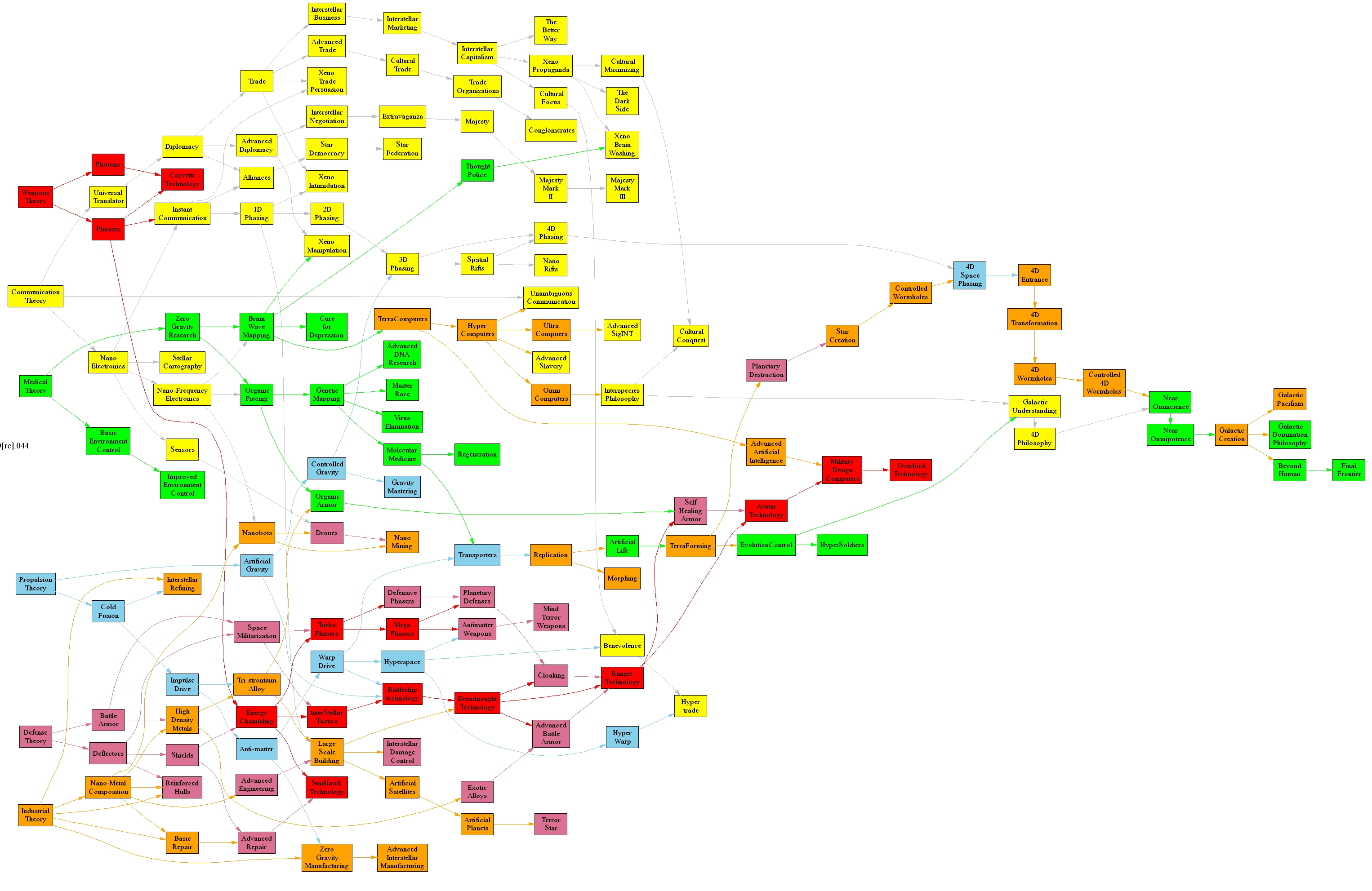
Click to enlarge.
More Information
A wealth of additional information, as well as enhancements and forums to chat with other players are available at http://www.galciv1.com.
Some Notes from the Designer...
Regarding populations in GalCiv...
Population increases in GalCiv, as mentioned in the yearly status, aren't
purely birth.
For instance, when the game starts, Earth has a population of around 2 billion.
But by the 22nd century it would likely be at around 20 billion. So what's the
deal?
It has to do with the number of citizens being reported. Only a fraction of the
Earth's population would be counted as a tax payer citizen. The rest would
still be too poor to pay taxes.
Let's look at Earth today:
Population 6 billion.
Population of NA and Europe: 800 million roughly.
China has about a billion, India nearly a billion. How many of them have an
income high enough to count on a global scale? What about Africa?
I know that might sound "Elitist", it's not meant to. The issue is
that in GalCiv, your taxes collected are based on citizens and so we count
those who are rich enough to do so.
If you raise your taxes, you'll eventually find your population lowering. Are
they dying? No. They are simply becoming too poor (unemployed, whatever) to pay
taxes.
In planetary invasions, the full population gets counted via planetary defense
bonuses. That is what many of the soldiering bonuses and such really mean -
arming the non-reporting population in the event of an invasion.